

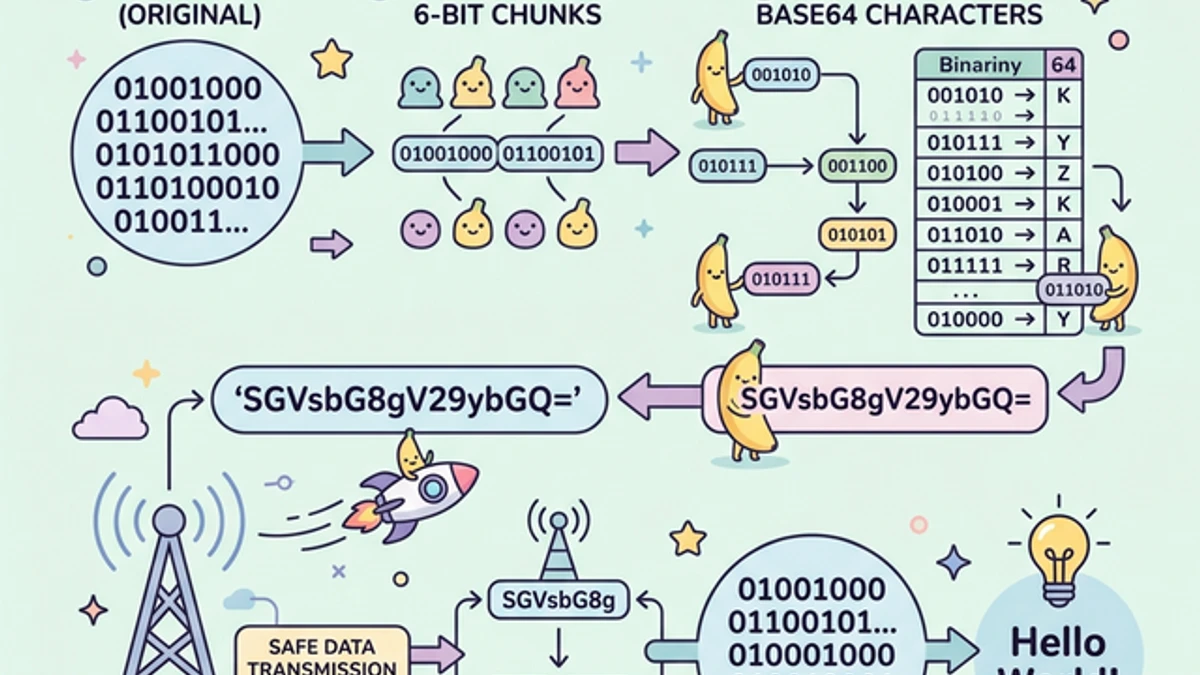
Modern software architecture relies heavily on moving complex data across various networks. Often, developers find themselves desperately needing to transmit a heavily compressed JPEG image, a cryptographic binary token, or complex Unicode strings across a protocol that is explicitly designed only to handle plain English text.
This is precisely the domain of Base64 Encoding. Base64 is not encryption; it is fundamentally a translation mechanism—a mathematical life-raft that rescues highly corruptible binary data and safely packages it into an indestructible string of ASCII characters.
In this architectural overview, we will completely dissect what Base64 is doing under the hood, exactly where you should deploy it, and crucially, where developers commonly misuse it.
The Core Concept: Why Base64 Exists
The internet’s fundamental routing protocols (like HTTP, SMTP, and XML) were originally architected decades ago. They were designed aggressively around the strict 7-bit ASCII standard—meaning they handle letters (A-Z), numbers (0-9), and basic punctuation perfectly.
However, non-text files (like a .png image, a compiled .pdf, or an .mp3 audio file) are comprised of 8-bit bytes (Binary). They contain completely random, unpredictable control characters that have no printable text equivalent. If you attempt to copy-paste raw binary data directly into a standard text payload or an HTTP header, the routing servers will instantly misinterpret the control characters, triggering fatal truncation or catastrophic data corruption during transit.
Base64 permanently solves this problem by completely disassembling your multi-layered binary 8-bit data into radically narrower 6-bit increments, and subsequently mapping those smaller chunks exclusively to the 64 safest, universally printable characters established by the ASCII table: A-Z, a-z, 0-9, +, and /.
How The Mathematics Works
Let’s translate the basic English word "Cat" into Base64:
- Convert to ASCII: The letters
C,a,tmap to the numerical ASCII decimal values67,97, and116. - Convert to 8-bit Binary:
- C =
01000011 - a =
01100001 - t =
01110100 - The total binary string is now:
010000110110000101110100(24 bits total).
- C =
- Slice into 6-bit Chunks: Base64 mechanically demands 6-bit groups.
- Group 1:
010000(Decimal: 16) - Group 2:
110110(Decimal: 54) - Group 3:
000101(Decimal: 5) - Group 4:
110100(Decimal: 52)
- Group 1:
- Map to the Base64 Index Table: By cross-referencing these decimals against the standard Base64 Index table:
- 16 =
Q - 54 =
2 - 5 =
F - 52 =
0
- 16 =
The standard English word "Cat" perfectly translates and transmits across the network as the ultra-safe encoded string: Q2F0.
(Note: If the binary source data does not divide perfectly by 3 bytes, Base64 pads the string with aggressive generic = characters at the very end to ensure perfect transmission alignment).
Crucial Production Use Cases for Developers
1. Data URIs in Frontend Architecture
When architecting blazing-fast React or Vue applications, managing dozens of tiny external image requests (like UI icons or loading spinners) can aggressively bottleneck the browser's HTTP waterfall.
Developers can seamlessly convert these tiny images into Base64 encoded 'Data URIs' and embed the raw string permanently directly into their CSS or inline HTML:
<img src="data:image/png;base64,iVBORw0KGgoAAAANSUhEUgAAABAAAAAQCAYAAAAf8..."
     alt="Embedded UI Icon" />
This entirely eliminates the physical HTTP network request entirely, vastly improving the First Contentful Paint (FCP) metric for the end-user. You can safely experiment with generating these strings using our Image to Base64 Encoder.
2. Basic HTTP Authorization Headers
When executing legacy REST APIs requiring Basic Authentication, standard protocol demands that you merge the username and password with a colon (username:password) and subsequently Base64 encode the final string.
Authorization: Basic QWxhZGRpbjpvcGVuIHNlc2FtZQ==
This encoding reliably ensures that even if your password contains incredibly bizarre special characters or spacing, it will never accidentally break the strict syntax requirements of the raw HTTP request header transmission.
3. Asymmetric Cryptography and SSL Certificates
When downloading massive public/private encryption keys natively (like SSH configurations .pem or Docker TLS .crt manifests), you will notice they always begin dynamically with -----BEGIN CERTIFICATE----- followed tightly by hundreds of randomized characters. This randomized structural block is pure Base64. It safely guarantees that your underlying raw binary mathematical cryptographic keys survive being transported across text-only email configurations or CI/CD text terminal windows.
⚠️ Critical Misconceptions and Anti-Patterns
Base64 is NOT Encryption
This is the most dangerous conceptual assumption in computer science. Encoding data into Base64 does not actually hide, scramble, or secure the underlying payload. Any arbitrary individual in the universe can reverse a Base64 string instantly in milliseconds utilizing a universally available online Base64 Decoder. Never pass sensitive financial configurations, Social Security Numbers, or internal connection strings dynamically encoded in Base64 assuming they are mathematically protected. You must utilize explicit encryption algorithms like AES-256 for definitive data-at-rest security.
Significant File Size Bloat
Because Base64 mathematically uses exactly 4 output text characters globally to represent 3 raw source binary bytes, encoding intrinsically balloons your original data size by nearly 33%.
While embedding a 5-kilobyte UI icon into your React bundle.js is incredibly efficient, attempting to recklessly Base64 encode a 15-megabyte high-resolution hero image directly into your CSS will completely paralyze Chrome's HTML parsing engine, destroying your performance. Massive operational structures must remain stored on a standard CDN network.
Conclusion
Base64 continues to exist purely as a foundational safety mechanism precisely designed for hostile digital environments that categorically despise binary infrastructure. By completely normalizing completely volatile arbitrary data into rock-solid letters and numbers, it provides developers the operational confidence that complex application states can be transmitted perfectly anywhere on earth. Use it for compatibility, avoid it for encryption, and leverage tools like our Base64 Encoder/Decoder to quickly troubleshoot your local network payloads.